TeamViewer Setup
Install the TeamViewer Full Client so support can remote into your computer.
Step 1 -- Download TeamViewer
Download the TeamViewer Full Client for Windows 64-bit.
Direct Download (Windows 64-bit)If the direct download does not work, go to teamviewer.com/en-us/download, select Windows, and download the Full Client.
Step 2 -- Send us your ID and password
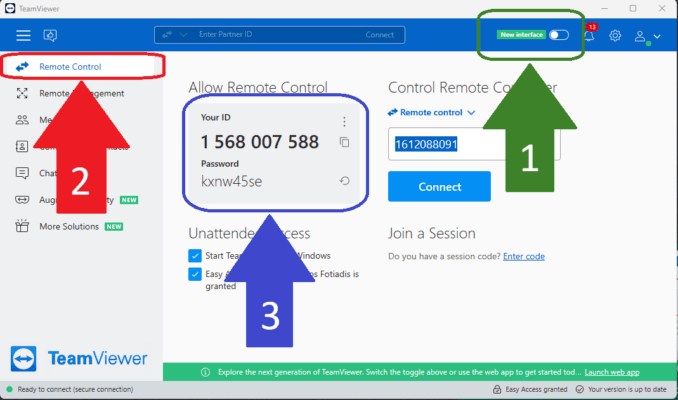
Once TeamViewer is installed, we need your ID and password to access your computer.
- Open TeamViewer and switch to the OLD INTERFACE.
- Click REMOTE CONTROL.
- Send your ID and password to support in your store's WhatsApp group.
Need to reach support?
Send your TeamViewer ID and password in your WhatsApp group so we can connect.